Complete Feature Guide

Master Athenum Analytics

Learn how to use all 15 professional trading tools. From orderbook analysis to prediction market arbitrage - everything you need to gain an edge.

Launch App

Trading Terminal

Live

Professional Trading Dashboard

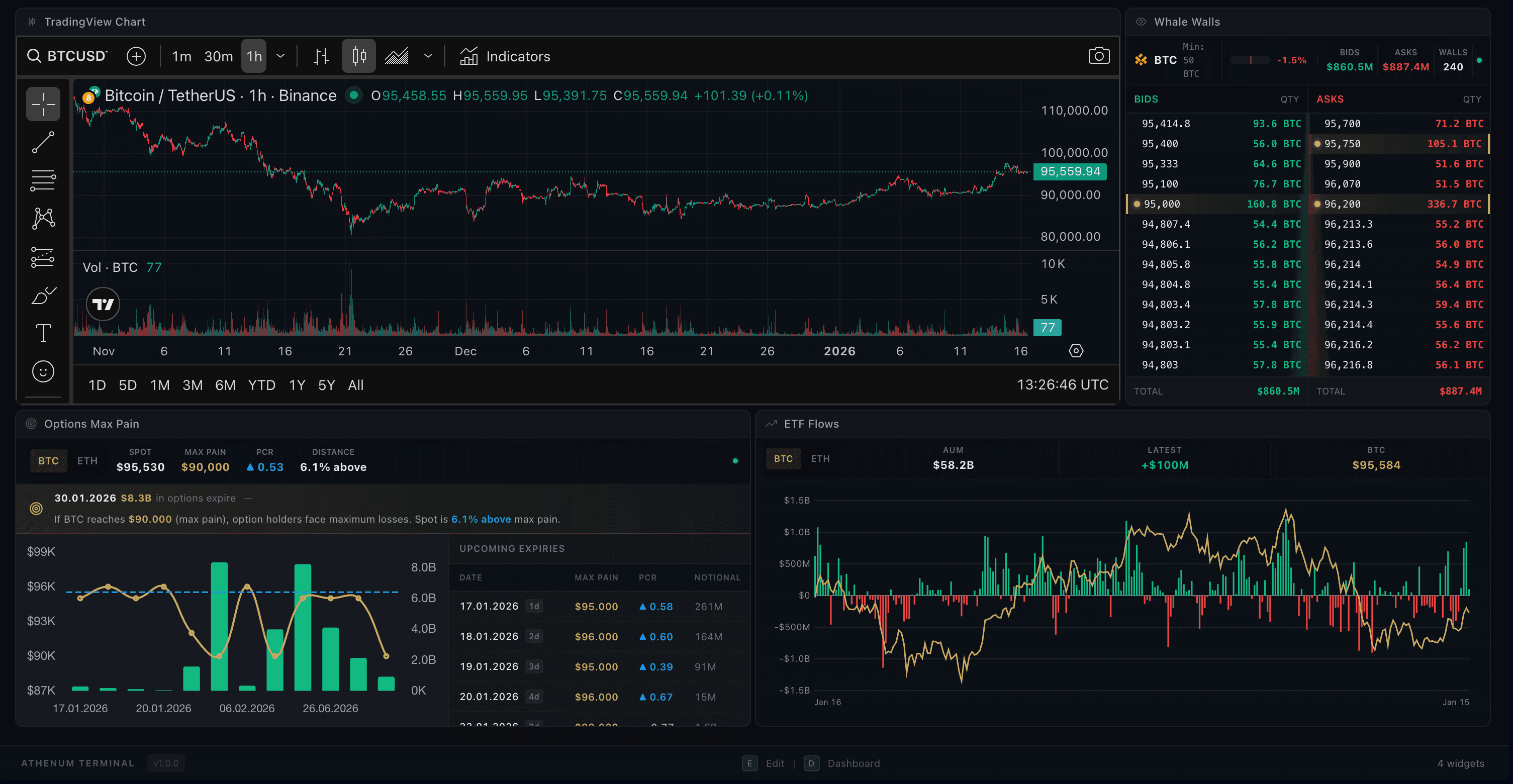
Athenum Trading Terminal - Professional Dashboard

The Terminal is your fully customizable trading workspace. Drag-and-drop widgets to build your perfect layout with charts, orderbooks, whale walls, and more - all synced to your selected trading pair.

Drag & Drop Widgets

Add, remove, resize and position 6 different widget types: Chart, Order Book, Whale Walls, Trade Feed, ETF Flows, and Options Max Pain.

Layout Templates

Choose from 8 predefined layouts or create your own custom workspace and save it for later.

Symbol Sync

All widgets automatically sync to your selected trading pair - change once, update everywhere.

Keyboard Shortcuts

Press E for Edit mode to customize, D to return to Dashboard, Esc to go back.

How It Works

1

Press E to enter Edit mode and customize your layout

2

Click the + button or drag widgets from the sidebar to add them

3

Resize widgets by dragging their edges, move them by dragging the header

4

Press D to lock your layout and return to Dashboard view

Pro Tips

  • Use the Scalping template for fast orderbook-focused trading
  • The Whale Watching template combines whale walls across all exchanges
  • Save your custom layout - it persists across sessions

Orderbook

Live

Multi-Exchange Whale Wall Detection

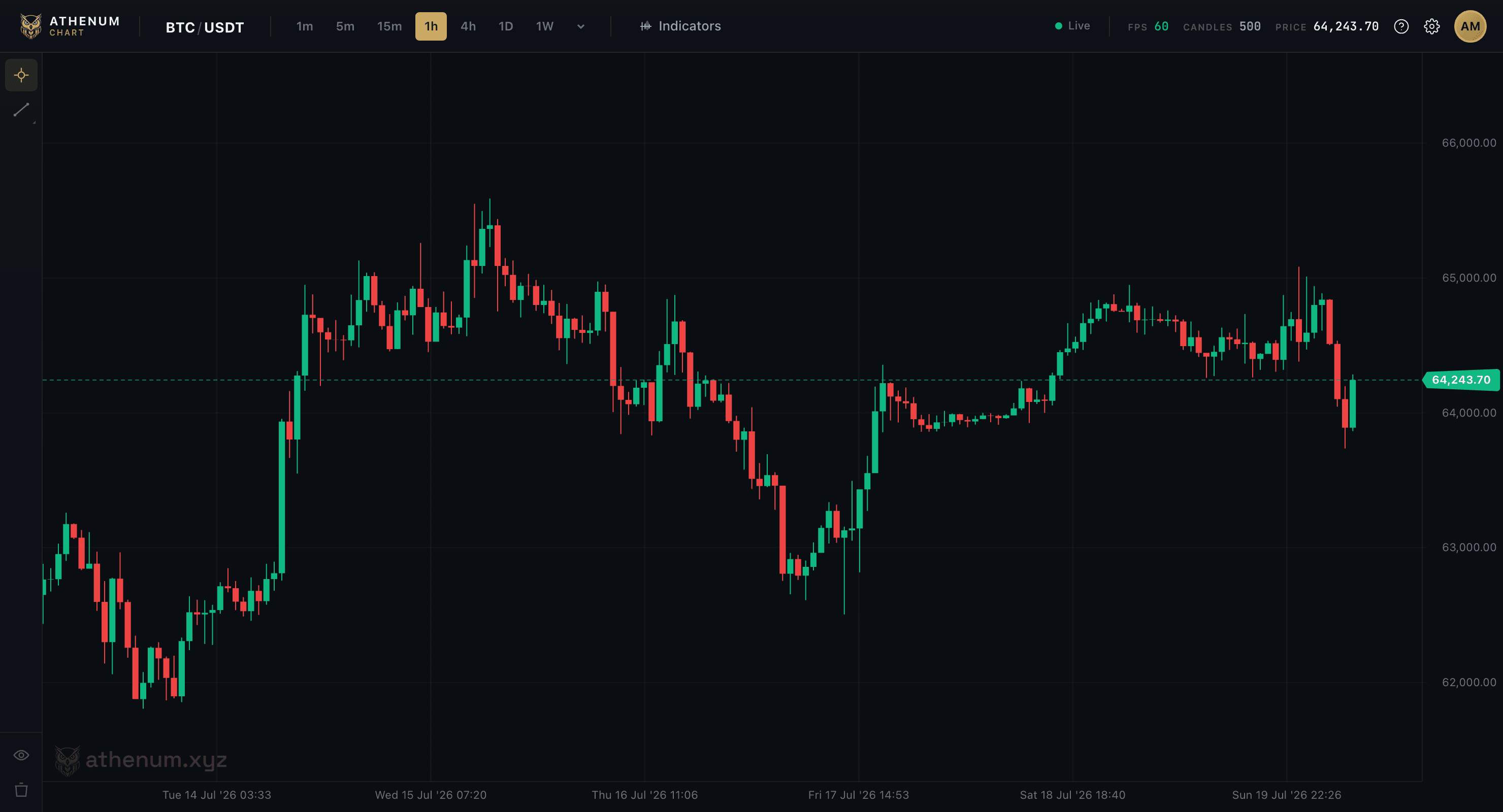
Athenum Orderbook - Multi-Exchange View

Track whale walls (large orders) across 4 exchanges in real-time. See where big money is positioning and identify potential support/resistance levels before price reaches them.

4 Exchange Coverage

Aggregated view from Binance Spot, Binance Futures, Coinbase Spot, and Hyperliquid Perpetuals - all in one screen.

Whale Wall Detection

Large orders are automatically classified into tiers (Mega, Large, Medium) and highlighted with fill tracking.

Customizable Thresholds

Set your own minimum wall size in USD or asset amount. Different thresholds for different trading pairs.

Real-time SSE Updates

Server-Sent Events deliver wall appearances, updates, cancellations, and fills as they happen.

How It Works

1

Select your trading pair from the dropdown (10 pairs supported)

2

Toggle between Horizontal, Compact, or Aggregate view modes

3

Adjust threshold settings to filter by wall size

4

Switch between USD and asset amount display

Pro Tips

  • Watch for large walls appearing just before key price levels
  • Walls that suddenly cancel when price approaches may be spoofing
  • Use the Bid/Ask imbalance gauge for quick sentiment reads

Options Max Pain

Live

Max Pain & Put/Call Analysis

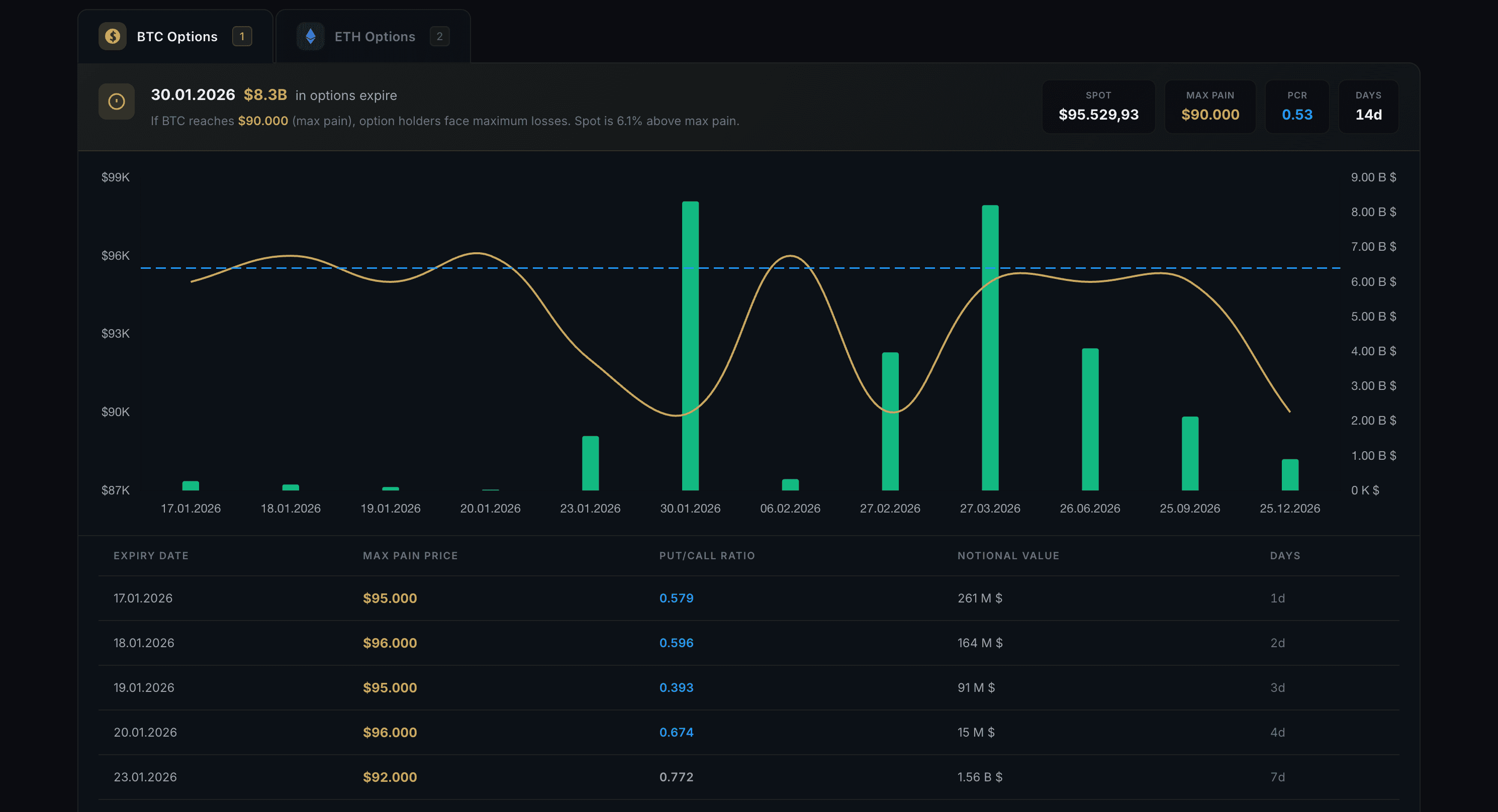
Athenum Options Flow - Max Pain Analysis

Analyze options market structure with Max Pain levels and Put/Call ratios from Deribit. Understand where market makers want price to settle at expiry.

Max Pain Levels

See the price level where the most options expire worthless for each expiry date - a key target for price action.

Put/Call Ratio

PCR for each expiry shows market sentiment - high PCR suggests bearish positioning, low PCR suggests bullish.

Multi-Expiry View

Compare max pain across all upcoming expiry dates to identify convergence zones and key levels.

Notional & Volume

Track total notional value and trading volume for each expiry to gauge institutional interest.

How It Works

1

Select BTC or ETH from the asset tabs

2

Review max pain levels across different expiry dates

3

Compare PCR values to gauge market sentiment

4

Check notional value to see where the big money is positioned

Pro Tips

  • Max Pain theory: Price tends to gravitate toward max pain as expiry approaches
  • PCR extremes (>1.5 or <0.5) often signal potential reversals
  • Focus on near-term expiries - max pain is most relevant in the final 2-3 days

ETF Flows

Live

Institutional BTC & ETH ETF Tracking

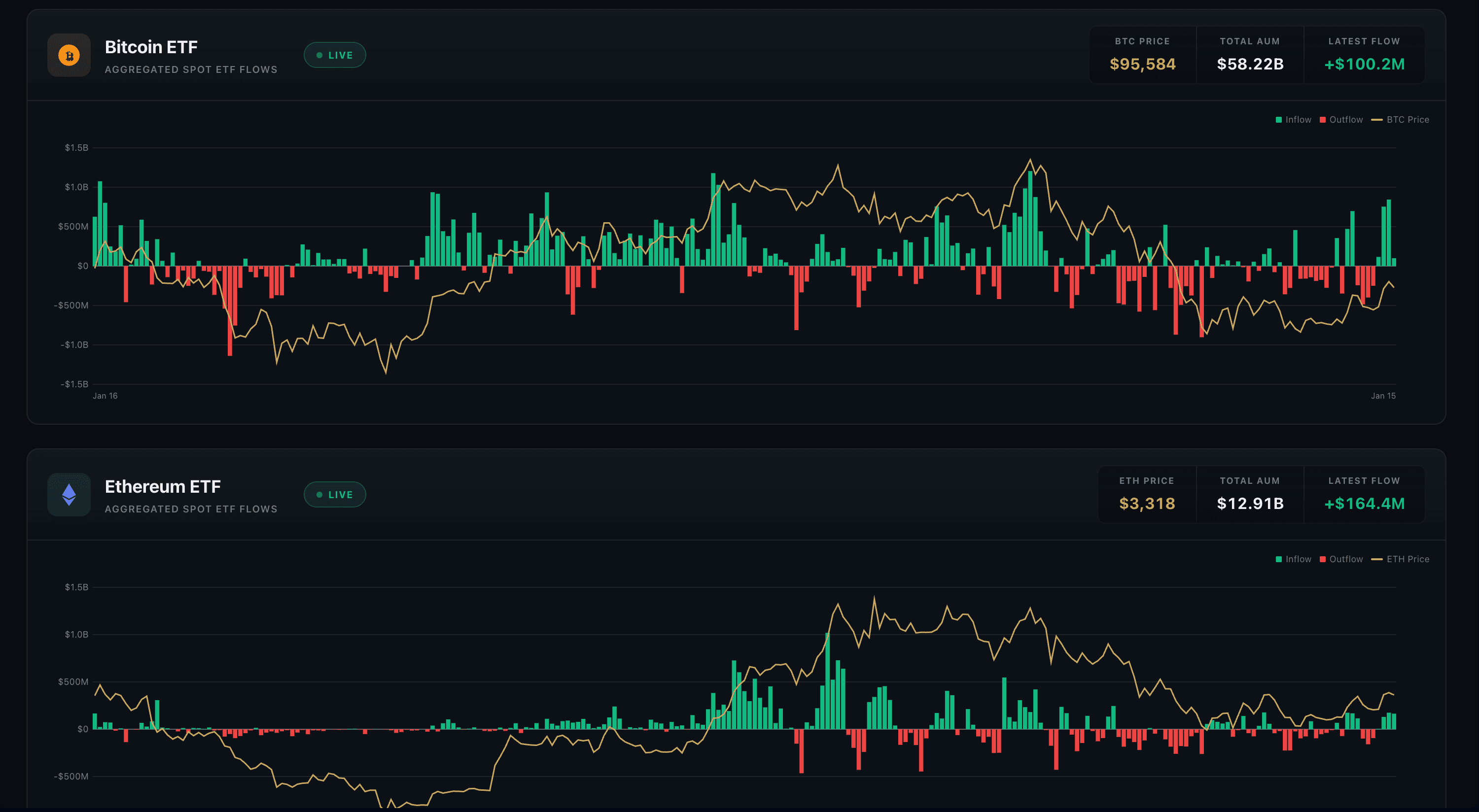
Athenum ETF Charts - Bitcoin & Ethereum ETF Tracking

Track aggregated institutional flows into Bitcoin and Ethereum spot ETFs. See 2 years of historical data with price correlation to understand how institutional money drives crypto markets.

Daily Flow Tracking

Net inflows and outflows aggregated across all major BTC and ETH spot ETFs, updated daily.

2-Year History

730 days of historical flow data lets you analyze long-term institutional accumulation patterns.

Price Correlation

ETF flows overlaid with price action - see how institutional buying/selling correlates with market moves.

Key Metrics

Current AUM, cumulative inflows, and latest daily flow displayed at a glance.

How It Works

1

Select BTC or ETH from the asset tabs

2

Green bars show net inflows (buying), red bars show outflows (selling)

3

The price line shows correlation between flows and market moves

4

Check cumulative inflow to see total institutional accumulation

Pro Tips

  • Consistent inflows over multiple days often precede price rallies
  • Large single-day outflows can signal distribution phases
  • Watch for divergence: price up but flows negative can warn of weakness

Funding Rate Heatmap

Live

Cross-Exchange Funding Rate Visualization

Funding Rate HeatmapLIVE
APR View100+ Pairs
Symbol
Binance
Bybit
Hyperliquid
BTC
+32.5%
+28.1%
+35.2%
ETH
+24.3%
+22.8%
+26.1%
SOL
+18.7%
+15.2%
+21.3%
DOGE
-12.4%
-8.9%
-15.6%
XRP
+8.2%
+6.5%
+11.4%
AVAX
+15.8%
+12.3%
+18.9%
LINK
+22.1%
+19.4%
+25.8%
ARB
-3.2%
-1.8%
-5.1%
OP
+11.5%
+9.2%
+14.3%
SUI
+45.2%
+38.7%
+52.1%
Shorts Pay
Neutral
Longs Pay
Extreme
Trapped Capital Indicator (TCI)
Detects at-risk leveraged positions
2 ALERTS
BTC Trapped Longs
High funding + price weakness
DOGE Trapped Shorts
Negative funding + price strength
Symbols Tracked
100+
Avg. Market APR
+18.4%
TCI Alerts
2

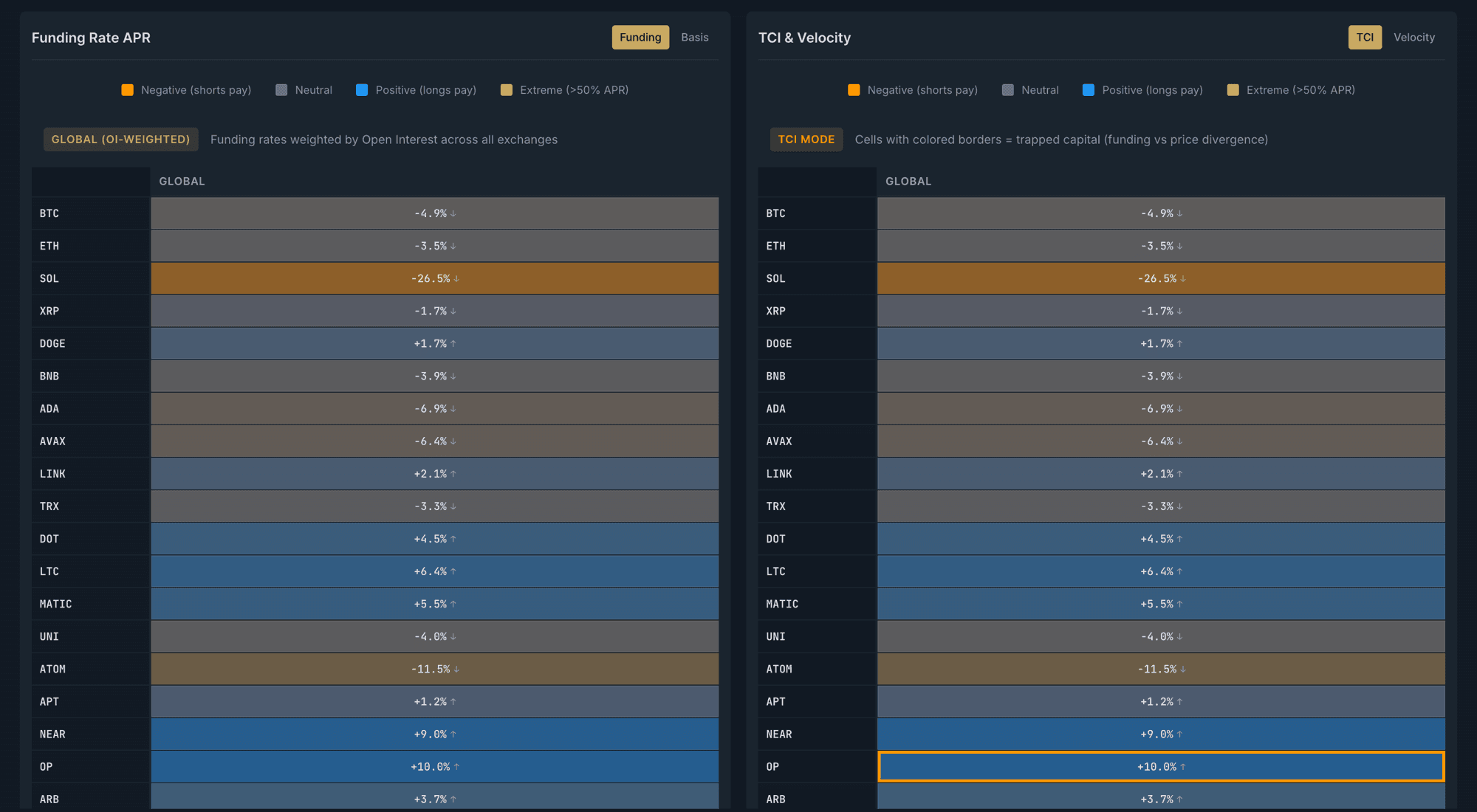
Visualize funding rates across 100+ perpetual pairs and multiple exchanges in a single heatmap view. Our Trapped Capital Indicator (TCI) detects when leveraged positions are at risk, helping you anticipate liquidation cascades and identify arbitrage opportunities.

Multi-Symbol Heatmap

Visual heatmap showing annualized funding rates (APR) across 100+ perpetual pairs in one view.

Cross-Exchange Comparison

Real-time funding rates from Binance, Bybit, and Hyperliquid displayed side-by-side for easy comparison.

Trapped Capital Indicator (TCI)

Proprietary metric detecting trapped longs (high funding + price weakness) and trapped shorts (negative funding + price strength).

Aggregated & Exchange Views

Toggle between OI-weighted aggregated view or per-exchange breakdown for detailed analysis.

How It Works

1

Use the heatmap to quickly identify extreme funding rates across all pairs

2

Watch for TCI alerts indicating trapped positions at risk of liquidation

3

Switch between Exchange and Aggregated views for different perspectives

4

Select different time periods (1h, 4h, 1d, 7d) to analyze funding trends

Pro Tips

  • Blue cells (longs pay) often indicate overleveraged long positions
  • Orange cells (shorts pay) suggest potential short squeeze setups
  • TCI alerts are leading indicators for potential cascade liquidations
  • Compare funding rates across exchanges to spot arbitrage opportunities

Range Analysis

Live

See Where The Money Is Positioned

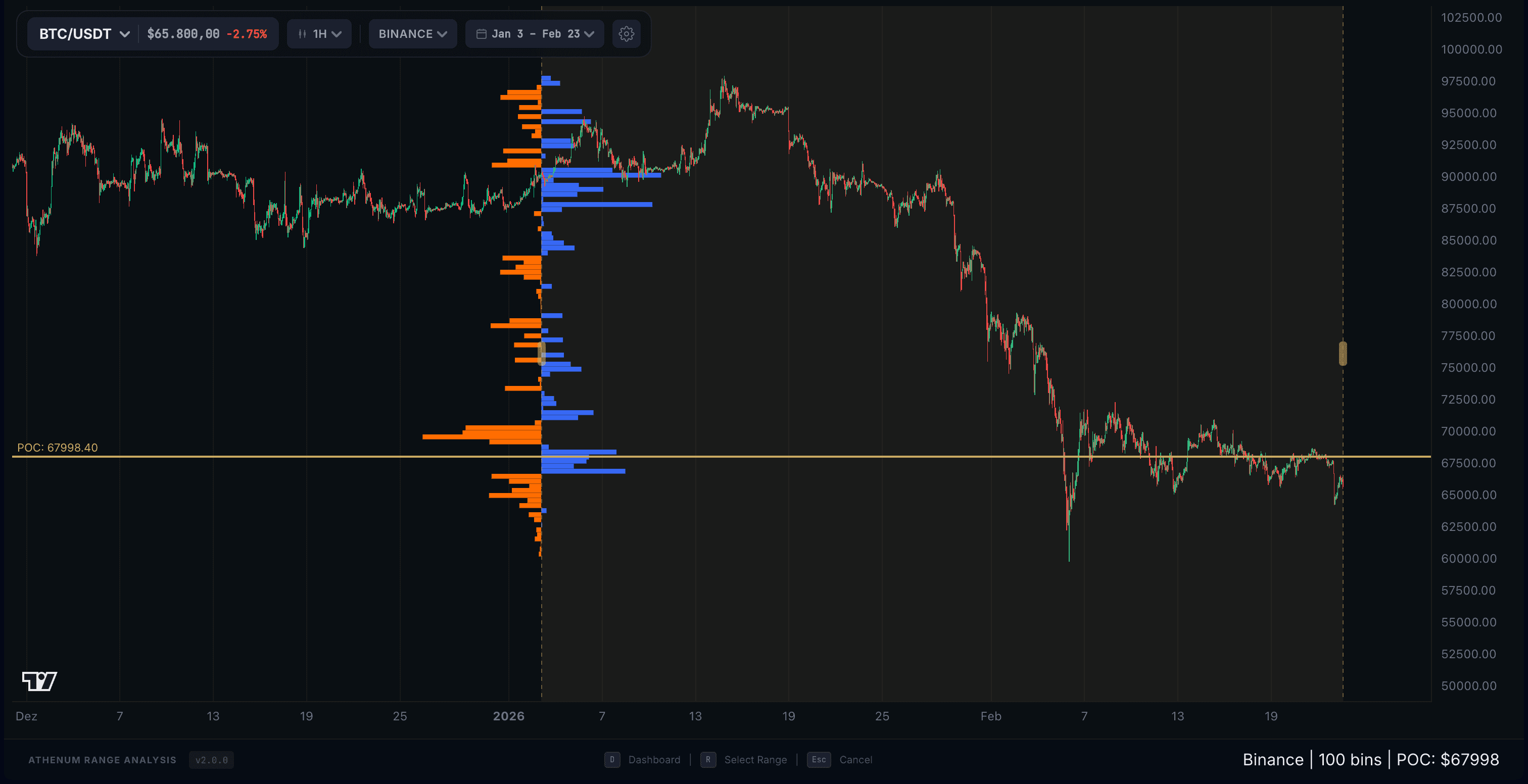
Athenum Range Analysis - OI Profile Chart

See where the money is positioned. Our Open Interest Profile aggregates data from 14 major exchanges to reveal the exact price levels where traders have skin in the game - giving you support and resistance levels based on real capital, not just historical price.

14-Exchange Aggregation

Combined OI data from Binance, Bybit, OKX, Bitget, Hyperliquid, dYdX, and 8 more exchanges. See the complete market picture.

Real-Time Calculation

Instant profile updates as you navigate. No lag, no waiting - powered by multi-threaded processing for smooth 60 FPS interaction.

Developing POC Tracking

Watch the Point of Control migrate over time. When POC moves up, buyers are accumulating. When it moves down, sellers are in control.

Absorption Zones

Highlights where large orders absorbed aggressive selling or buying without moving price - key institutional defense levels.

How It Works

1

Select your asset and timeframe (1m to 1D supported)

2

Green bars show bullish positioning, red bars show bearish positioning

3

The POC (Point of Control) marks the price with the most activity

4

Enable Developing POC to track how value shifts over time

Pro Tips

  • High OI clusters often act as magnets for price
  • POC moving up = bullish accumulation in progress
  • Use Aggregated mode to see all 14 exchanges combined
  • Strong absorption zones often become future support/resistance

Volume Delta

Live

Aggregated CVD Futures & Spot

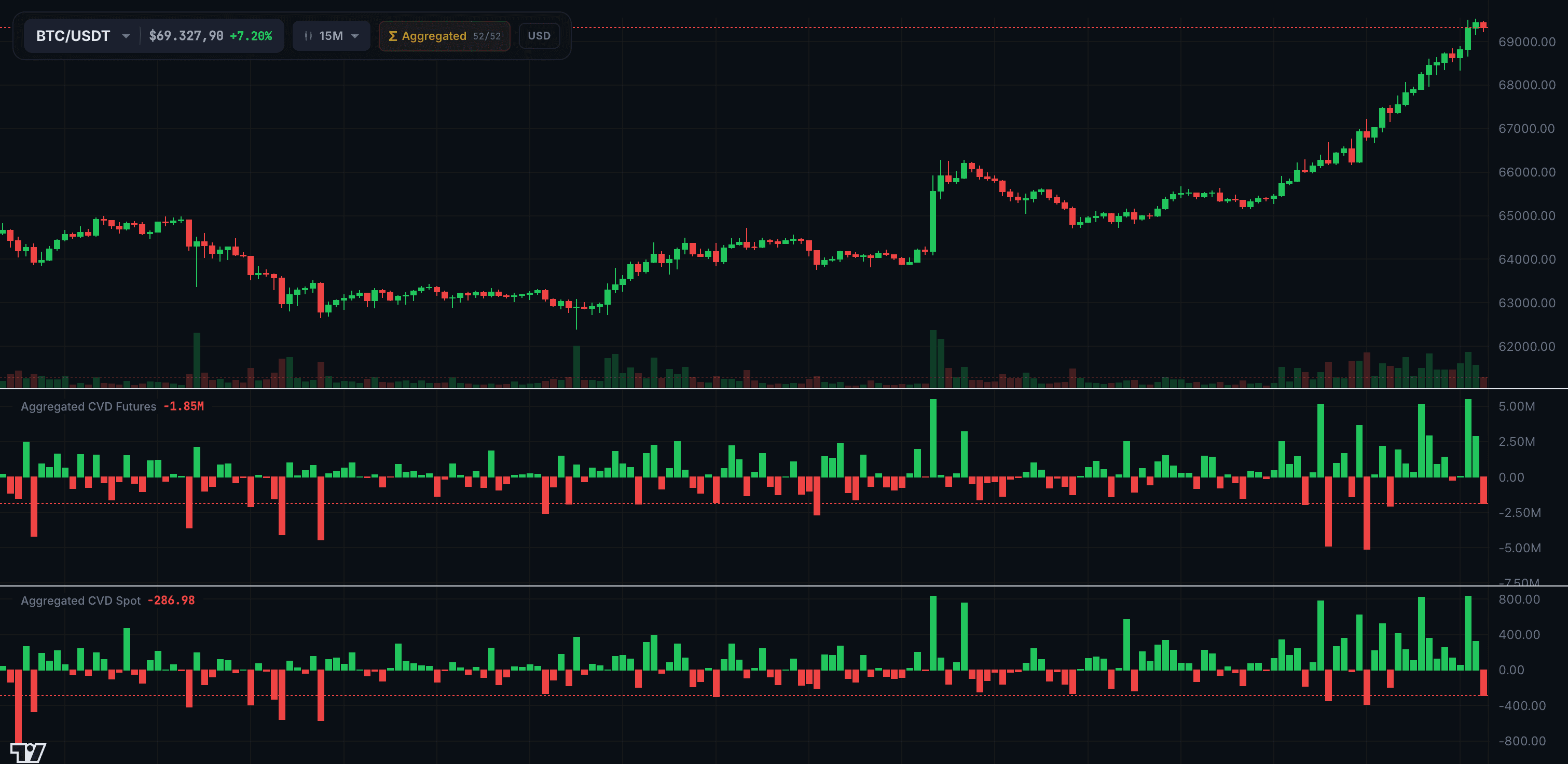
Athenum Volume Delta - Aggregated CVD Futures & Spot

Track the Cumulative Volume Delta (CVD) across futures and spot markets in a single three-pane view. The top pane shows price action, while the middle and bottom panes display aggregated CVD for futures and spot respectively — revealing whether aggressive buyers or sellers are in control on each market type. Divergences between futures CVD and spot CVD are among the most reliable signals for anticipating trend reversals.

Three-Pane Layout

Candlestick chart on top with dedicated CVD histograms for Futures and Spot beneath — see price, futures aggression, and spot aggression at a glance.

Multi-Exchange Aggregation

CVD data aggregated across all major exchanges. No single-exchange bias — see the true market-wide buying and selling pressure.

Futures vs Spot Divergence

When futures CVD and spot CVD diverge, it signals a potential trend reversal. Spot buying with futures selling often precedes squeezes.

12 Timeframes

From 1-minute scalping to daily macro views — analyze volume delta across any horizon to match your trading style.

How It Works

1

Select your trading pair (BTC/USDT) and timeframe from the toolbar

2

Green bars indicate net buying pressure (aggressive buyers), red bars indicate net selling pressure

3

Compare the Futures CVD pane with the Spot CVD pane — look for divergences

4

Use Aggregated mode to see volume delta across all exchanges combined

Pro Tips

  • Spot CVD rising while futures CVD is flat or falling = organic demand, bullish signal
  • Futures CVD spiking without spot support = leveraged move, likely to reverse
  • Large CVD spikes on low timeframes often mark exhaustion points and short-term reversals
  • Watch for CVD divergence from price — price making new highs while CVD declines warns of distribution

World Map Intelligence

Live

Real-Time Global Intelligence Map

Athenum World Map Intelligence - Geospatial OSINT Dashboard

A full-screen interactive intelligence map with 77 data layers across 14 categories — from military bases and undersea cables to earthquakes and cyber threats. Powered by 30+ authoritative sources like NASA, USGS, and NOAA, it gives you a real-time picture of what's happening around the world and how it could impact markets.

77 Intelligence Layers

Explore military installations, undersea cables, energy infrastructure, conflict zones, cyber threats, and much more. All organized in 14 easy-to-browse categories with a built-in budget system so you never overload the map.

Real-Time Event Feed

Live earthquakes, wildfires, protests, weather alerts, and disaster warnings streaming in from official sources. Filter by severity (critical to low) and time window (last hour to last 7 days).

Predictive Analytics

Automatic detection of unusual event spikes, military activity surges in sensitive regions like the Taiwan Strait or Persian Gulf, and infrastructure cascade analysis that shows what breaks when critical systems go down.

Proximity Intelligence

Click any event on the map and instantly see all critical infrastructure within 600km — undersea cables, pipelines, military bases, nuclear sites, ports, and power plants.

How It Works

1

Browse and toggle layers from the left panel — 14 categories with search and filtering

2

Jump to any region instantly with presets: Global, Europe, Asia, MENA, Americas, Africa, Pacific, or Arctic

3

Click any event on the map or in the feed to see full details, cascade impact analysis, and nearby infrastructure

4

Keep an eye on the toolbar badges — they alert you to anomalies, military surges, and unusual government activity

Pro Tips

  • Layer infrastructure data over conflict zones to see which critical cables and pipelines are at risk during geopolitical tensions
  • Use cascade analysis to discover hidden dependencies — one undersea cable cut can knock out internet for entire regions
  • Share your exact map view via URL — your layer selection, zoom, and position are all saved in the link

Futures Overview

Live

Multi-Asset Derivatives Dashboard

Athenum Futures Overview - Multi-Asset Derivatives Dashboard

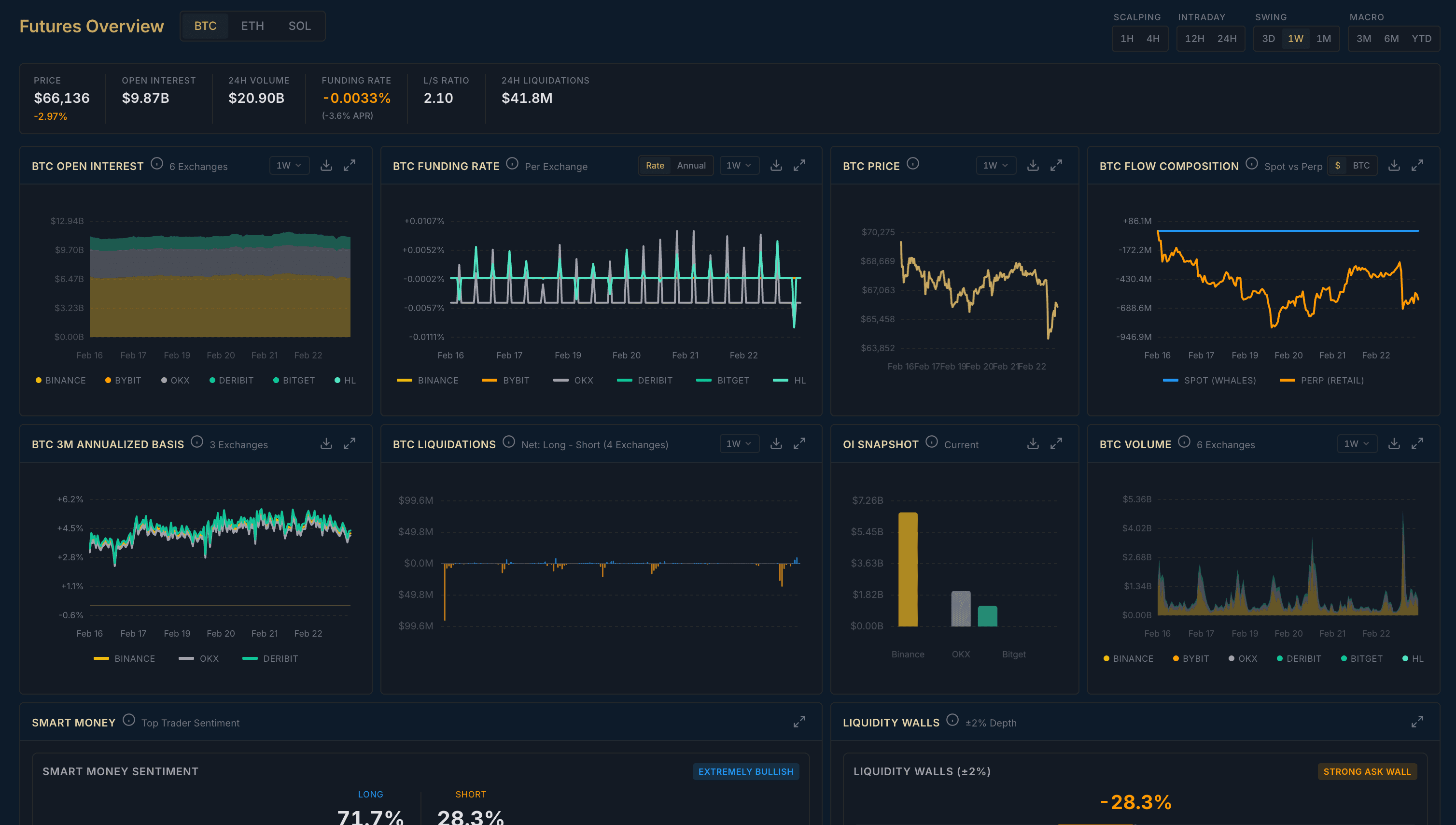
Your complete futures dashboard for BTC, ETH, and SOL. Twelve analytics cards covering everything from Open Interest and Funding Rates to Liquidations, Smart Money Sentiment, and Seasonality — all powered by data from 7 major exchanges including Binance, Bybit, OKX, and Deribit.

12 Analytics Cards

Open Interest, Funding Rate, Price, Flow Composition, Annualized Basis, Liquidations, OI Snapshot, Volume, Smart Money Sentiment, Hourly & Daily Seasonality, Session Returns, and Liquidity Walls — all in one bento-box dashboard.

Multi-Asset Support

Switch between BTC, ETH, and SOL with one click. Every card updates instantly with data specific to your selected asset.

10 Timeframes

From 1-minute scalping to monthly macro views. Timeframes are grouped by style — Scalping, Intraday, Swing, and Macro — so you always pick the right one.

7-Exchange Coverage

Aggregated data from Binance, Bybit, OKX, Deribit, Bitget, Hyperliquid, and Lighter. See the full market picture, not just one exchange.

How It Works

1

Select your asset (BTC, ETH, or SOL) from the top tabs

2

Pick a timeframe that matches your trading style — Scalping for fast moves, Macro for big picture

3

Scan the dashboard cards for standout readings like extreme funding rates, OI spikes, or liquidation surges

4

Use Smart Money Sentiment and Liquidity Walls to see where institutional players are positioned

Pro Tips

  • When Open Interest is rising and price is rising, the trend has strong conviction — new money is entering
  • Extreme funding rates (positive or negative) often signal that one side is overleveraged and due for a correction
  • Check Spot vs Perp Flow Composition to see whether the move is spot-driven (stronger) or perp-driven (more fragile)
  • Hourly Seasonality helps you time entries — some hours consistently outperform others

Macro Terminal

Live

Institutional Macro Intelligence Platform

Athenum Macro Terminal - Regime Radar Dashboard

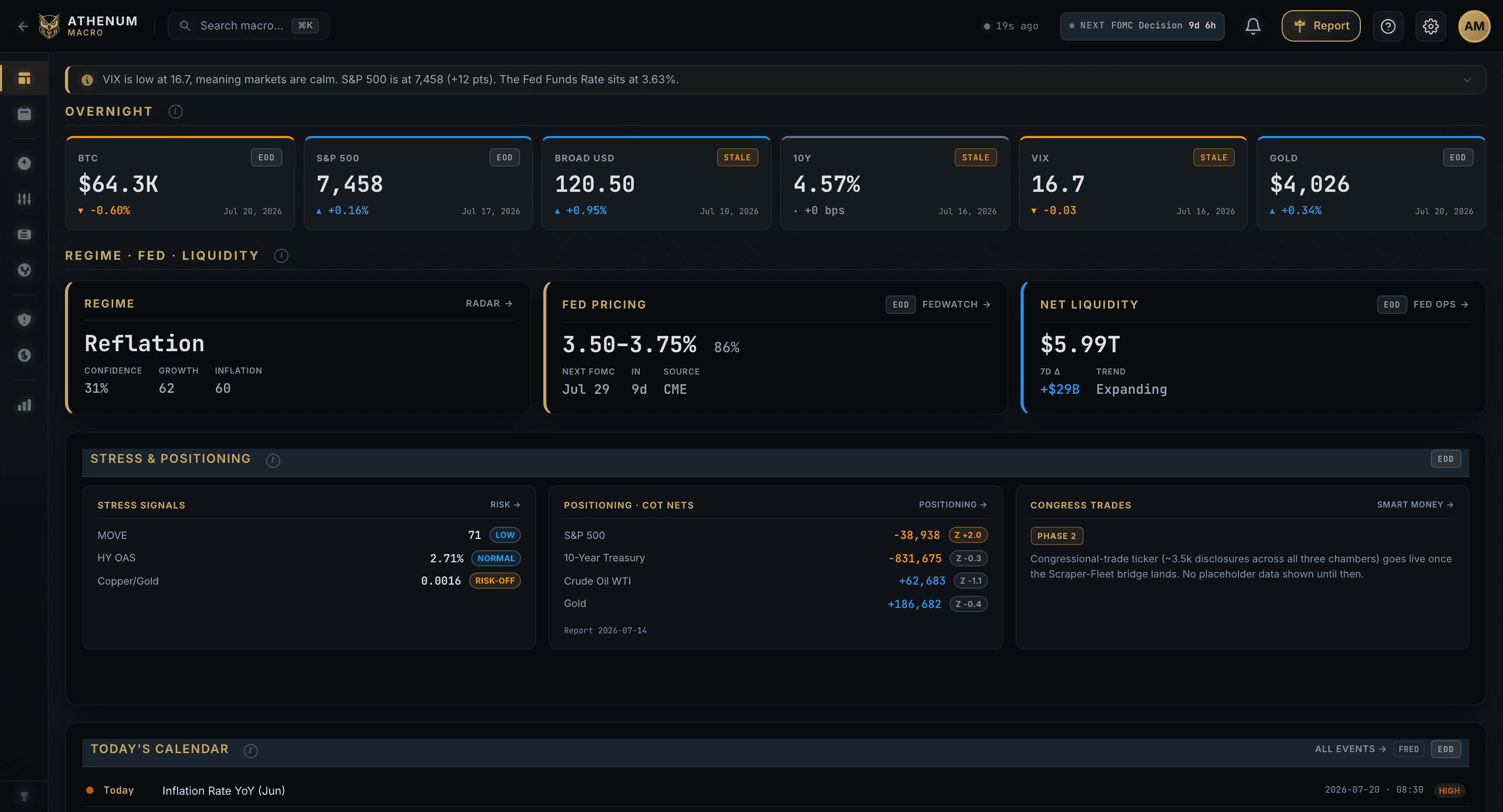
A full-scale macroeconomic intelligence platform with 41 pages of analysis across 10 sections. Track real-time indicators like VIX, Treasury yields, Fed Funds rate, and inflation — powered by 21 data providers including FRED, IMF, ECB, and OECD. From policy decisions to liquidity cycles, everything you need to understand the macro picture and its impact on crypto.

10 Analysis Sections

Charts, Dashboard, Policy, Liquidity, Research, Global, Risk, Cycles, Crypto, and Library — 41 pages covering every angle of macro analysis with keyboard shortcuts (1-9, 0) for instant navigation.

489 Data Series

Browse and chart 489 macro indicators across 31 categories. Build custom multi-source charts combining economic data, market indices, crypto prices, and on-chain metrics in one view.

Macro Regime Radar

A five-axis radar showing the current macro regime across Growth, Inflation, Liquidity, Policy Ease, and Stress — so you can see the big picture at a glance and spot regime shifts early.

Crypto-Macro Bridge

Connect the dots between macro events and crypto markets. Bitcoin halving cycles, on-chain metrics (SOPR, MVRV, NUPL), crypto-equity correlation, and liquidity flow analysis — all in one place.

How It Works

1

Use keyboard shortcuts 1-9 and 0 to jump between sections, or Cmd+K to open the command palette

2

Start with the Dashboard for a quick overview of key indicators, upcoming events, and market regime

3

Dive into Policy and Liquidity sections to understand what the Fed is doing and how money is flowing

4

Check the Crypto section to see how macro conditions are translating into crypto market moves

Pro Tips

  • The Regime Radar is your best friend for big-picture positioning — when all five axes align bullish, risk assets tend to rally
  • Watch the yield curve spread (10Y-2Y) in the Risk section — inversions have historically preceded recessions by 12-18 months
  • Use the Research backtester to test how macro indicators historically predicted crypto moves
  • The Library section has 118 institutional document sources from central banks and multilateral organizations — great for deep research

Correlation Matrix

Live

Multi-Asset Correlation Heatmap

Athenum Correlation Matrix - Multi-Asset Correlation Heatmap

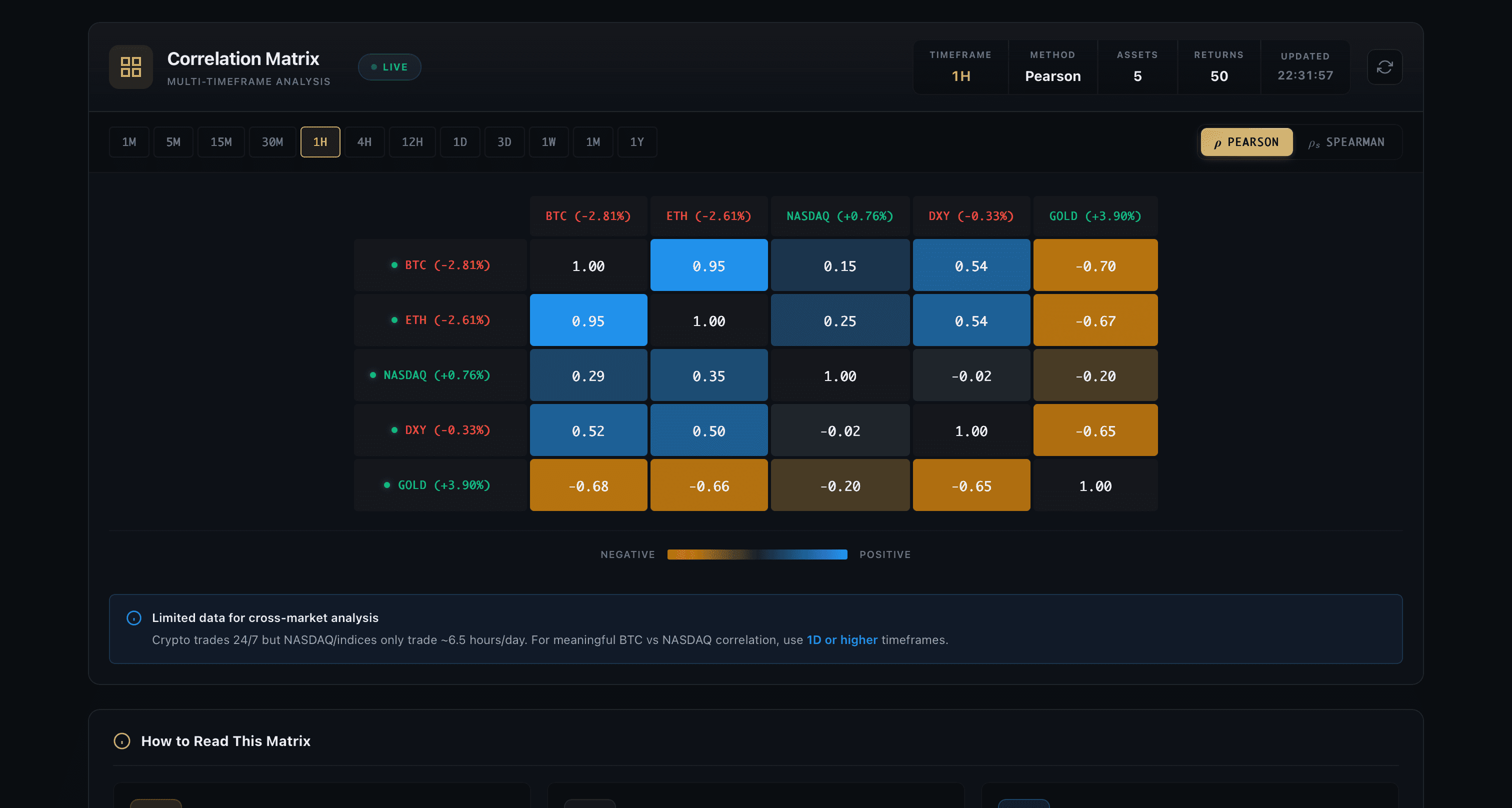
See how assets move together — or apart. The Correlation Matrix shows you real-time correlations between crypto, stocks, currencies, and commodities in a visual heatmap. Built on statistically sound log-return methodology, it helps you spot diversification opportunities, detect regime changes, and understand cross-market dynamics at a glance.

12 Timeframes

From 1-minute to 1-year — analyze correlations across any horizon. Whether you're scalping or building a long-term portfolio, pick the timeframe that matches your strategy.

Pearson & Spearman Methods

Choose between Pearson (linear correlation) for normal markets and Spearman (rank-based) for crash-resistant analysis. Switch with one click to see how relationships hold under different conditions.

Cross-Market Support

Compare crypto assets (24/7 markets) with stocks, forex, and commodities (traditional hours). Smart timestamp alignment handles the different trading schedules automatically.

Interactive Heatmap

A color-coded matrix showing correlation strength from -1.0 (perfectly inverse) to +1.0 (perfectly correlated). Blue means they move together, orange means they move opposite. Customize your 5-symbol grid freely.

How It Works

1

Click any symbol slot to change it — search from thousands of crypto pairs and traditional assets

2

Pick your timeframe to match your trading horizon (1h is a good starting point)

3

Switch between Pearson and Spearman to see how correlations behave in normal vs extreme conditions

4

Watch for correlation changes over time — breakdowns often signal regime shifts in the market

Pro Tips

  • When BTC-NASDAQ correlation breaks down, it often signals a crypto-specific narrative is taking over
  • High correlation between assets means they won't protect you in a crash — look for low or negative correlations for true diversification
  • Use Spearman during volatile periods — it's more robust to the extreme moves that make Pearson unreliable
  • Compare 1h vs 1d correlations — if short-term correlation diverges from long-term, a reversion may be coming

Coming Soon

These features are currently in development and will be available soon.

Sentiment Analysis

Coming Soon

Social Sentiment & Divergence Detection

Prediction Markets

Coming Soon

Polymarket & Kalshi Arbitrage Scanner

Funding Rates

Coming Soon

Cross-Exchange Funding Rate Monitor

CME Gap Detector

Coming Soon

CME Futures Gap Analysis